You're in the coffee line at a conference. The person next to you turns out to be exactly who you came to meet. You talk for four minutes, the line moves, and they hold up their phone with a QR code. You scan it. An app store page opens. You smile, say you'll grab it later, and you never do.
That card lost. It had nice fonts and probably great reviews, and it still lost, because the person receiving it hit a wall.
That's what this post is about. If you're searching for the best digital business card app, you've probably noticed the lists all crown whoever wrote them. I'm going to be upfront: I'm Menash, and I built SwiftCard with one other person, so I'm a vendor too. I won't pretend to be neutral. What I'll do instead is give you the tests that decide whether a card app is any good, the prices I could actually find, and an honest read on where SwiftCard wins and where it doesn't.
Who wrote the list you just read
Go back through the top results for this search. Wave Connect's roundup picks Wave Connect. SPOTIO's list ranks SPOTIO first and is written for field sales teams. HiHello ranks HiHello first, on a page still dated 2025. V1CE picks V1CE. Most of them are feature tables with little sign of anyone handing a card to a stranger and watching what happens.
That's normal, it's marketing. But it means the useful part for you is the method, so the method comes first.
What the best digital business card app actually does for you
A card app has one job: make sure the conversation you just had doesn't die in the parking lot. Everything else is decoration. Here are the tests I'd run on any app, SwiftCard included, before trusting it with a trade show.
Test 1: Send it to a friend who has nothing installed
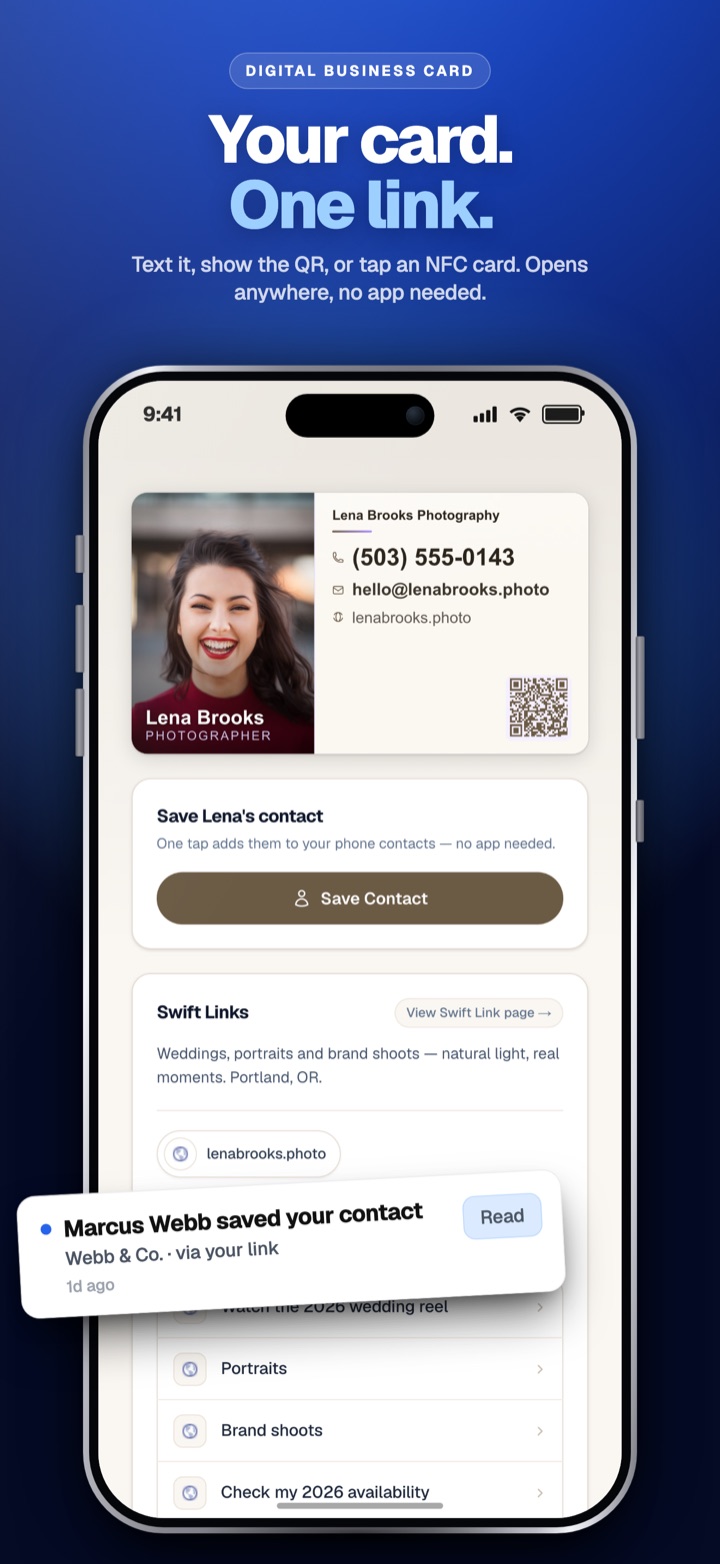
Make a free card, text the link to a friend, and ask them to save your contact. Watch their screen. If they need to download anything, create an account, or tap through more than a couple of screens, you'll lose people in real life, where nobody's doing you a favor.
This is the test the coffee line card failed. A browser card that opens instantly with a clear Save Contact button beats any app that asks the other person to install something.
Test 2: Ask what flows back to you
This is the one most roundups skip, and it matters most. When someone opens your card, do you get anything back? Their name, their number, a note about when you met?
A paper card is a one way street. You hand it over and hope. A good digital card lets the other person share their details back with you in a few taps, so you're no longer waiting on them to call. If the app only shows your info and gives you nothing in return, it's a prettier paper card.
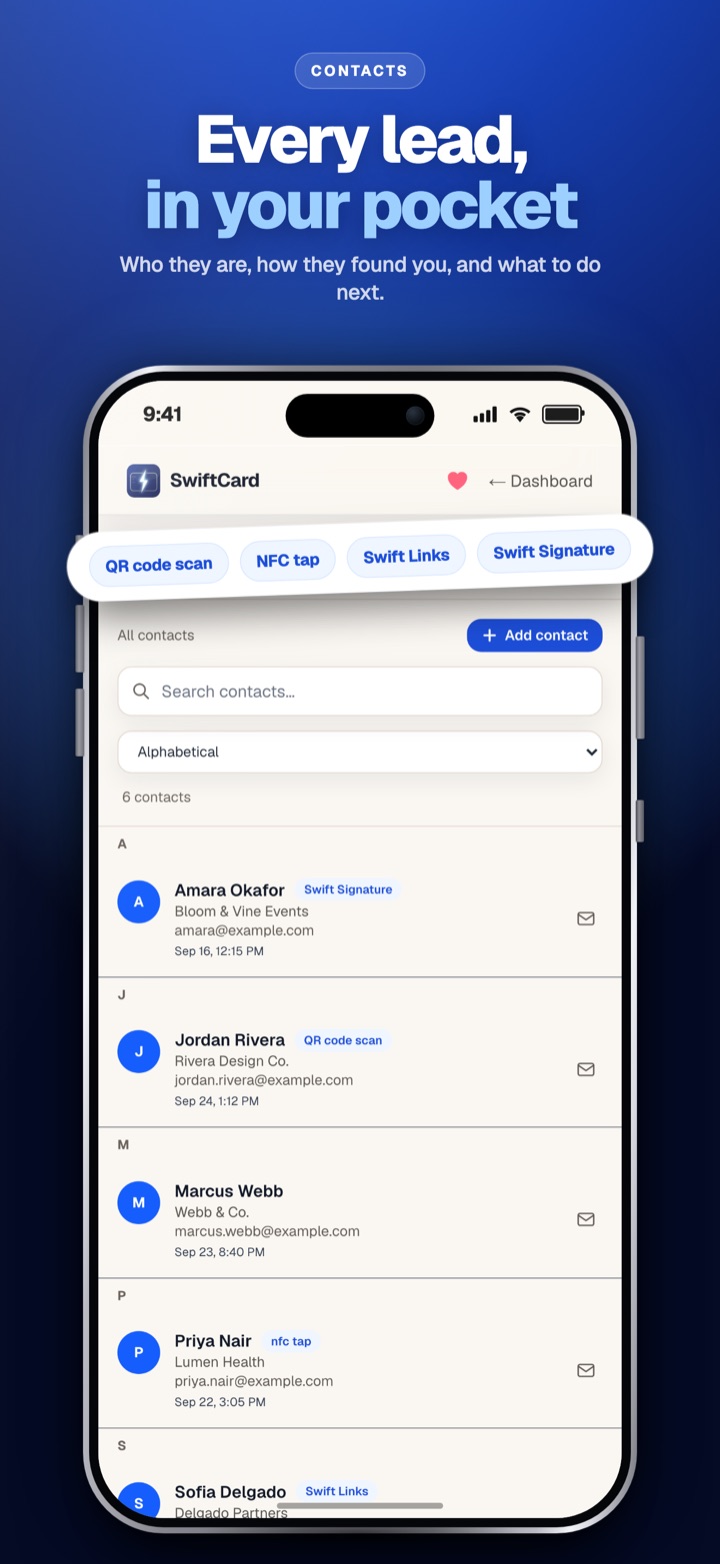
We built SwiftCard because of exactly this gap. The person who scans your card can send their details to you from the card itself, and they land in a contacts list with notes. I wrote up the full mechanics in how a digital business card with lead capture works.
Test 3: Read the free plan like a contract
Every app says "free." They mean wildly different things. Some free profiles need a card you buy first. Some cap how many cards you get. Some let you collect contacts but hide export behind a paid plan. Before you commit, find out exactly what is limited and what happens when you hit the limit.
Test 4: Check the ways to share
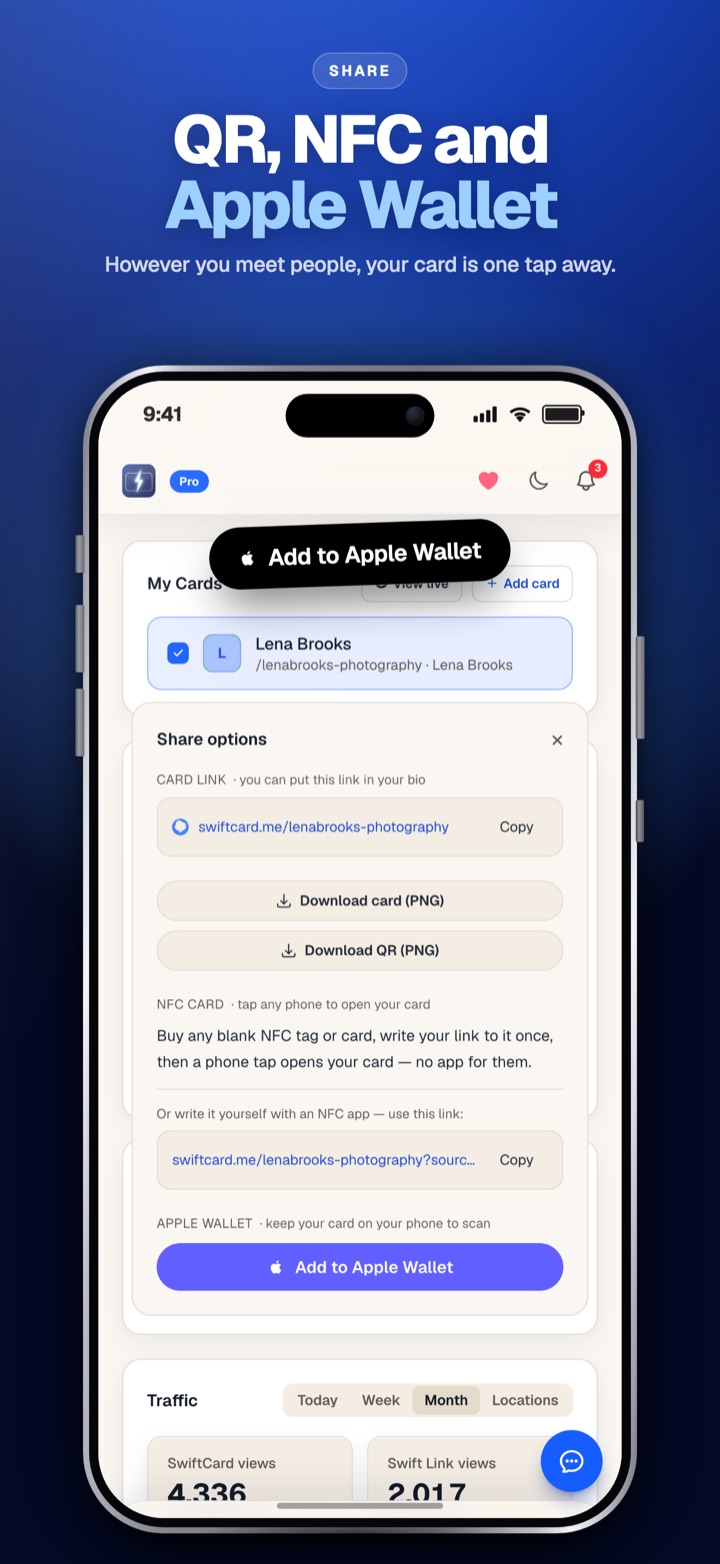
Real moments are messy. At an open house you want a QR code on a sign. Over text you want a link. At a meetup an NFC tap is fastest. Your email signature is where half your contacts actually see you. An Apple Wallet pass means your card is one swipe away even with no signal. The app should handle the moment you're in, not force one method.
Test 5: Find the export button before you need it
Your contacts are your business. Look for how they leave the app: a spreadsheet download, a CRM connection, or nothing. Do this on day one, not the day you decide to switch.
Digital business card app prices I could find (October 2026)
The research behind this table was partial, and most of it came from third party pages, so treat these as a starting point and check each vendor's own pricing page before buying.
| App | How you start | Paid price found | Source |
|---|---|---|---|
| SwiftCard | Free forever, 1 card | Pro $4.99/mo or $54/yr; Office $3.99/seat/mo | Our pricing page |
| Popl | Free plan | Pro $7.99/mo or $76.99/yr | vendelux.com, checked 28 September 2026 |
| Blinq | Free, 1 to 2 cards | Premium $9.99/mo, or $7.33/mo billed annually | Blinq support pages, seen October 2026 |
| HiHello | Personal tier (price not captured) | Professional $72 billed yearly | hihello.com/pricing, undated, may be stale |
| Mobilo | Buy an NFC card | Branded card $19.99 list | mobilocard.com, undated, may be stale |
| Dot | Buy a device, profile is free | Card $30 one time, metal $50 | digitalbusinesscard.com, no month given |
A few honest notes on the competition. Blinq's free plan is generous; its support pages list QR sharing, Apple and Google Wallet and an email signature on Free. HiHello has solid fundamentals and lets you run several cards. Popl and Mobilo have strong hardware lines if a branded physical card is the thing you want in your hand. Dot's devices are nice objects. None of that is fake praise.
Where SwiftCard fits, and where it doesn't
The person I build for meets people face to face and lives on referrals: agents, loan officers, recruiters, contractors, stylists, founders at networking events. For that person, SwiftCard does a few things in one place that other apps split across tools.
Your card and your link in bio page are the same link. Swift Links sits under your card with your socials and extra links, so one QR code covers both jobs. When someone shares their details from your card, they go into a contacts list with notes. You can switch on automatic follow up emails for any contact, on the free plan, so the "great meeting you" message goes out while you're already talking to the next person. And the recipient never installs anything.
Now the limits, because you'll find them anyway:
- Free gets 1 card and 5 new contacts a month. Contacts past that are still captured and stored, just hidden until you upgrade. We never throw them away.
- The AI business card scanner and AI written follow ups are Pro only. There's no free allowance.
- Spreadsheet export and CRM connections (Salesforce, HubSpot, Pipedrive, GoHighLevel, Google Contacts, Zapier) are Pro.
- Pro starts with a 14 day free trial, and a card is taken at checkout. Cancel anytime and you keep access to the end of the period you paid for.
If you meet a handful of new people a month, Free will genuinely do the job. If you work events or open houses, you'll outgrow 5 contacts fast, and Pro at $4.99 a month is the cheapest paid tier in the table above. You can see how we stack up tool by tool on our comparison page.
The quickest way to judge all this is to run Test 1 on SwiftCard yourself. Make a free card, text it to a friend, and watch what they see.
Which card app for which person
Solo professionals and freelancers
You want to start free, skip buying hardware, and have contacts come back to you. Run Tests 1 and 2 on any shortlist. This is where SwiftCard is strongest, because capture and follow up are included instead of bolted on through integrations.
Small teams and offices
You want every card to look the same and every contact in one list that stays when someone leaves. SwiftCard Office does that at $3.99 per seat a month, with a 2 seat minimum (you plus one teammate). You set the logo and design once and lock it. More detail on SwiftCard for teams. HiHello's own pricing page listed a Business tier at $5 per user a month, so it's worth comparing if you're already in their world.
Enterprise sales teams
If you need procurement, demos and a rollout across hundreds of reps, vendors like Popl and Linq sell to that buyer. Popl's teams pricing was quoted only after a demo, according to vendelux.com in September 2026.
People who want a physical card first
If tapping a metal card is the point, Dot or Mobilo make sense. Just know you're paying for an object before you've tested the software behind it. SwiftCard works with an NFC tag too, but you don't need one to start, and you can add your card to Apple Wallet for free.
Who shouldn't bother with a digital card
If your work happens almost entirely through referrals from a few longtime clients, and you rarely meet strangers, a card app won't change much. If you're a creator selling merch to fans, a creator tool like Beacons is built for that. And if your crowd truly prefers paper, carry a few, then put a QR code on the back that opens your digital card. You get both.
Frequently asked questions
What is the best free digital business card app?
The one whose free plan covers what you'll actually use. If you need contacts to come back to you with follow up, SwiftCard's free plan includes the share back form, a contacts list and automatic follow up emails. If you only need to show your info, Blinq's free plan is generous.
Do I need to download an app to share a digital business card?
No. With SwiftCard you manage your card in the browser, and the person you share it with opens it in their browser too. They don't need an app or an account to save your contact.
Is an NFC card worth buying, or is a QR code enough?
A QR code works on nearly every phone and costs nothing. NFC is a nice touch if you meet lots of people in person. Start with a QR code and add a tag later if you want the tap.
Can I export my contacts if I switch apps?
Check before you commit. On SwiftCard Pro and Office you can download contacts as a spreadsheet or send them to your CRM. On Free, contacts live in your SwiftCard contacts list.
Which digital business card works best for a team?
Look for shared branding, locked designs and contacts that stay with the company. SwiftCard Office covers those for teams from 2 seats.
The lists will keep crowning their authors, mine included. Run the five tests and you won't need them. If you want to start with ours, create your free SwiftCard and send it to someone who has nothing installed.