Someone finds you on Instagram the night after an open house. They tap the link in your bio and get a column of buttons: website, listings, reviews, a podcast you recorded once. They tap one, scroll for a few seconds, and close the tab. You'll never know they were there. They were maybe the warmest lead you had all week.
That's the problem with most of the advice you'll find when you search for a Linktree alternative. The lists that rank compare which tool has nicer buttons or a bigger template library. If you're a creator selling presets, fair enough. If you're an agent, a loan officer, a consultant or a recruiter, the buttons were never the point. The point is the person on the other side of the screen, and a link list lets them walk away without leaving a name.
So this post takes a different angle. I'm Menash, one of the two people who built SwiftCard, and I'll tell you what to look for, who should honestly stay on Linktree, and why we think professionals need a link page that is also a business card.
The short answer: the best Linktree alternative for professionals
If you sell to fans and need a store, look at Linktree's paid plans or a creator tool like Beacons. Both are built for that.
If people find you, meet you, and hire you on trust, you want three things a link list doesn't do on its own. A contact card visitors can save to their phone in one tap. A short form that sends their details back to you. And follow up that starts without you remembering to do it. That combination is why we built SwiftCard, and it's the angle the rest of this post argues.
What Linktree does well
Credit where it's due. Linktree made the link in bio a normal thing. Setup takes minutes, the format is instantly familiar to anyone who taps it, and for creators with lots of destinations it's a tidy hub.
The paid plans add more. A pricing roundup on elev8or.io, read in October 2026, described Starter as adding a personalised page and basic analytics, Pro as removing branding and adding mailing list integrations, and Premium as adding link routing and data export. That same page listed Starter at $8 a month ($6 billed yearly), Pro at $15 ($12 yearly) and Premium at $35 ($30 yearly), and it listed a 12% seller fee on the Free plan. It also said it couldn't read the prices straight off Linktree's own page, and unilink.us showed lower numbers. Check linktr.ee before you decide anything based on price.
Where a link list falls short when you sell yourself
A link list is a menu. Menus are fine when the visitor already knows what they want. Most of your visitors don't. They're curious about you, and curiosity fades in about a day.
Here's what that costs a professional:
- No way to save you. Your phone number lives on a separate page, or nowhere. The visitor has to copy it by hand, so they don't.
- No way for them to reach out on their terms. A buyer who isn't ready to call might happily leave a name and number. A list gives them nowhere to do it.
- Counts instead of people. Tap totals tell you interest exists. They don't tell you who to call on Monday.
- Nothing after. Even when someone does click through, nothing nudges them a second time.
If your income runs on referrals and repeat business, those four gaps are where the money leaks out.
What to look for in a Linktree alternative as a professional
Use this as a checklist, whichever tool you pick.
- A real contact card on top. One tap should save your name, number, email and photo into their phone.
- A share back form. The visitor should be able to send you their details, and those should land in a list you can work from.
- Follow up that runs itself. An email that goes out while the moment is fresh beats a reminder you'll snooze.
- Names when possible, totals always. You should see views and taps, plus who the person was when they chose to share.
- Works in person too. QR code, NFC tap, Apple Wallet, a text. Your bio link and the card you hand out at a closing should be the same thing.
- One link that updates everywhere. Change your number once and every place you've shared it is current.
Our link in bio with analytics page goes deeper on point four if tracking is what's bugging you most.
Linktree vs. Beacons vs. SwiftCard at a glance
| Linktree | Beacons | SwiftCard | |
|---|---|---|---|
| Built around | A list of links | Creators selling to fans | A business card with a link page under it |
| Free plan | Yes | Yes | Yes, free forever |
| Paid price seen | From $8/mo, or $6/mo yearly (elev8or.io, Oct 2026, unverified) | Creator Pro $10/mo (elev8or.io) | Pro $4.99/mo or $54/yr |
| Fee on sales | 12% on Free (elev8or.io, Oct 2026) | 9% on Free and Creator Pro (elev8or.io) | No store, so no sales fee |
| Contact card people save to their phone | Not what it's built for | Not what it's built for | Yes, on every plan |
| Visitor can send you their details | Not the core product | Not the core product | Yes, into your Contacts list |
| Automatic follow up | No | No | Email on Free, plus text on Pro |
The Beacons numbers come from the same elev8or.io roundup, which also listed Store Pro at $30 a month and Business Pro at $90. If you sell digital products, Beacons is a reasonable pick and you should look at it properly.
How SwiftCard works as your link in bio and your business card
When someone taps your bio link, the first thing they see is your card: photo, name, title, and a big Save Contact button. Scroll down and your Swift Links page sits right under it with your socials and the links you choose.
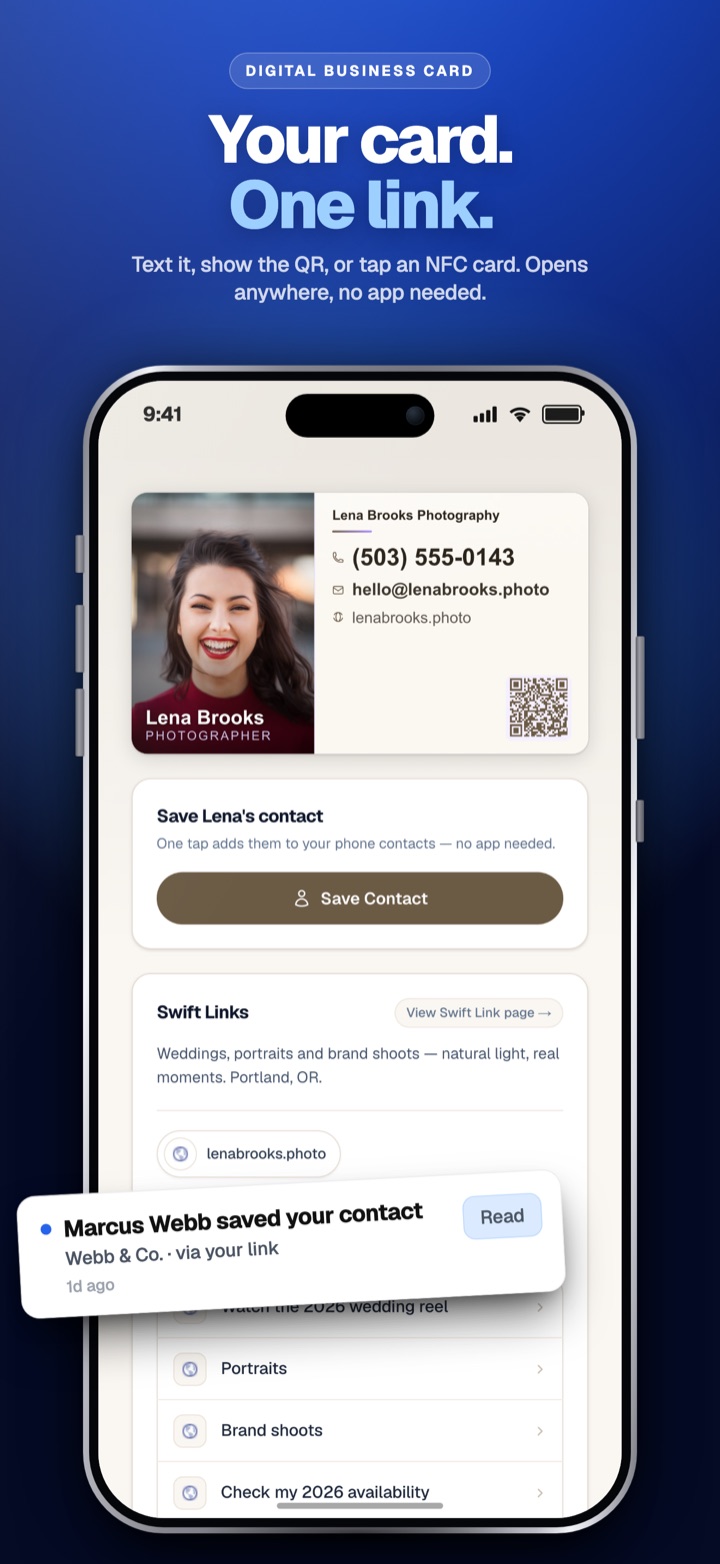
That order matters. The visitor meets you first and your links second, the same way they would in person.
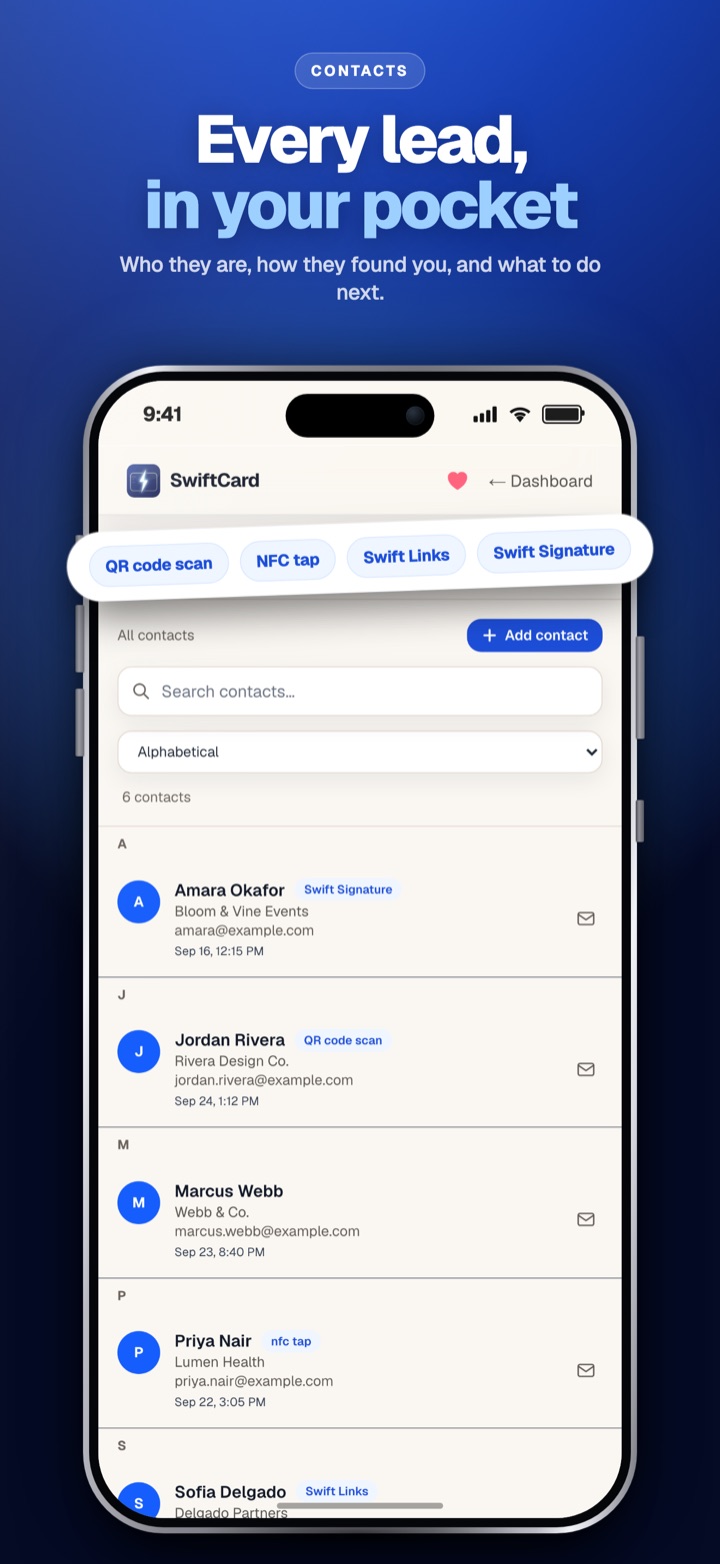
If they share their details through the form, they land in your Contacts list with room for notes. You can switch on automatic follow up emails for any contact, and send your card back to them in one tap. That's the lead capture part, and on Free it works from day one.
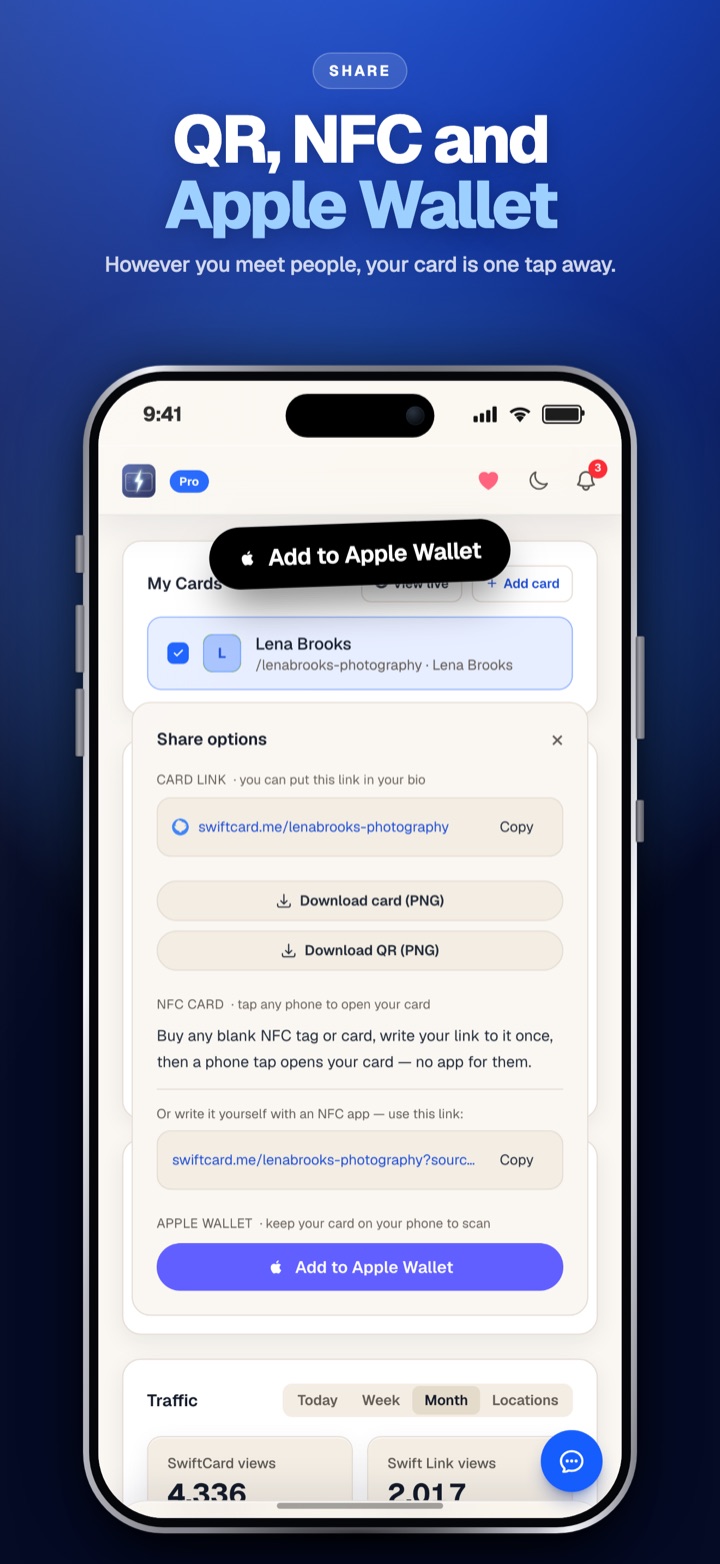
The same link works off screen. You can share it as a QR code on a yard sign, a text after a coffee meeting, an NFC tap at a conference, or a pass in Apple Wallet. Swift Signature turns the card into your email signature, so every reply you send carries it too. The person you share with never needs an app.
For stats, Free shows card views, Swift Links views and link taps. Pro adds who viewed your card when they've shared their details with you, and which cities your views come from.
If you want to try it with your own links before reading further, you can create a free card here. It takes a few minutes and you can paste the link into your bio today.
What the free plan gets you, honestly
I'd rather you know the limits up front than find them later.
Free is $0 forever. You get 1 card, all 6 card designs, your Swift Links page with your socials plus 2 extra links, Swift Signature, the Contacts list with notes, automatic follow up emails, and basic stats. You can save up to 5 new contacts a month. That meter resets on the 1st and counts per account. If more people share their details than that, they're still captured and stored, just hidden until you upgrade. Nobody gets thrown away. There's also a small SwiftCard note at the bottom of your emails and Swift Links page.
Pro is $4.99 a month or $54 a year, and it starts with a 14 day free trial (a card is collected at checkout, and you can cancel before it ends). It removes every limit: unlimited cards, contacts and links. It adds text message follow ups, AI drafted follow ups, a scanner that types in paper business cards for you, custom designs and backgrounds, and exports to Salesforce, HubSpot, GoHighLevel, Pipedrive, Google Contacts, Zapier or a spreadsheet.
One honest note for Linktree users: if your current page has nine links, Free's 2 extra links will feel tight. Either trim to what people actually tap, which usually helps anyway, or go Pro. Full details are on the pricing page.
Moving off Linktree in an afternoon
You don't need a big migration plan.
- Open your Linktree and write down which links get tapped. Drop the ones nobody uses.
- Create your card and pick a design. Local Business puts your phone number front and center. Photo First suits agents and stylists who sell on a face.
- Add your socials and your top links to Swift Links.
- Swap the URL in your Instagram, TikTok and LinkedIn bios.
- Turn on Swift Signature so your email carries the same card.
- Switch on follow up emails, then print the QR code for your next event or listing.
Keep your Linktree live for a week if you're nervous. Old links in old posts will still work while new traffic flows to the card.
Who should stay on Linktree
If you're a creator with dozens of destinations, a shop and no interest in who your visitors are, Linktree is good at exactly that. Same if all you want is a free list and nothing else. SwiftCard is for people whose next client is one saved contact away. We wrote a longer side by side on our Linktree alternative comparison page.
Frequently asked questions
Is there a free Linktree alternative?
Yes. SwiftCard's Free plan is free forever and includes a business card, a Swift Links page with your socials and 2 extra links, and up to 5 new contacts a month.
What is the best Linktree alternative for professionals?
One that puts a saveable contact card above your links and lets visitors send you their details. Creators selling products are better served by Linktree's paid plans or Beacons.
Do people need an app to open my SwiftCard?
No. It opens in any phone browser from a link, QR code or NFC tap, and saving your contact takes one tap.
Can I see who visited my link in bio?
On Free you see card views, Swift Links views and link taps. On Pro you also see who viewed your card when they've shared their details, plus the cities your views come from.
Can I use the same link for my bio and my business card?
That's the whole idea. One SwiftCard link works in your bio, your email signature, a QR code and Apple Wallet, and it updates everywhere when your details change.
Your bio is already sending you people. Give them a way to save you and say hello back. Create your free card and put the new link in your bio tonight.